What is an eCheck? Electronic check payments for rent

An eCheck, or electronic check, is a payment that pulls money from a checking account using the account's routing number and account number, without a paper check changing hands. The payer authorizes the payment online, by phone or on a form, and the money moves between banks electronically, in the United States usually over the ACH network. For rent, a tenant who enters their bank details in a payment portal and clicks pay is often making an eCheck payment.
This page covers what an eCheck is, how an eCheck payment moves from a tenant's bank to yours, how eChecks compare with paper checks, ACH transfers, cards and wires, what happens when one is returned, a worked example on the ledger and what to put in your lease. It is general information and is not legal or tax advice. Some states and cities limit returned payment fees and late fees, or say which payment methods an owner must accept. Rules vary by state and city. Check your local law or an attorney.
What is an eCheck?
A paper check is an instruction to the payer's bank to pay a sum to the person named on it. An eCheck carries the same instruction electronically. The payer gives the details printed at the bottom of a check (the bank's routing number and the account number) and agrees to the amount and date. The payee's payment processor turns that into an electronic debit and sends it to the payer's bank.
Most eChecks in the United States travel as ACH debits, so an eCheck and an ACH payment from a checking account are often the same payment under two names. Payment companies tend to say "eCheck" because it sounds familiar to people who have written paper checks. The ACH payment guide covers the network itself, its timing and its fees in more detail.
A few related terms you will see:
- Electronic check conversion. A merchant scans a paper check at the counter or in the mail and turns it into an electronic debit, then hands back or destroys the paper.
- Remote deposit. You photograph a check you received and deposit the image through your bank's app. The check itself stays a paper check, and the deposit happens electronically.
- Bank transfer or pay by bank. Many payment pages use these names for the same kind of debit from a bank account.
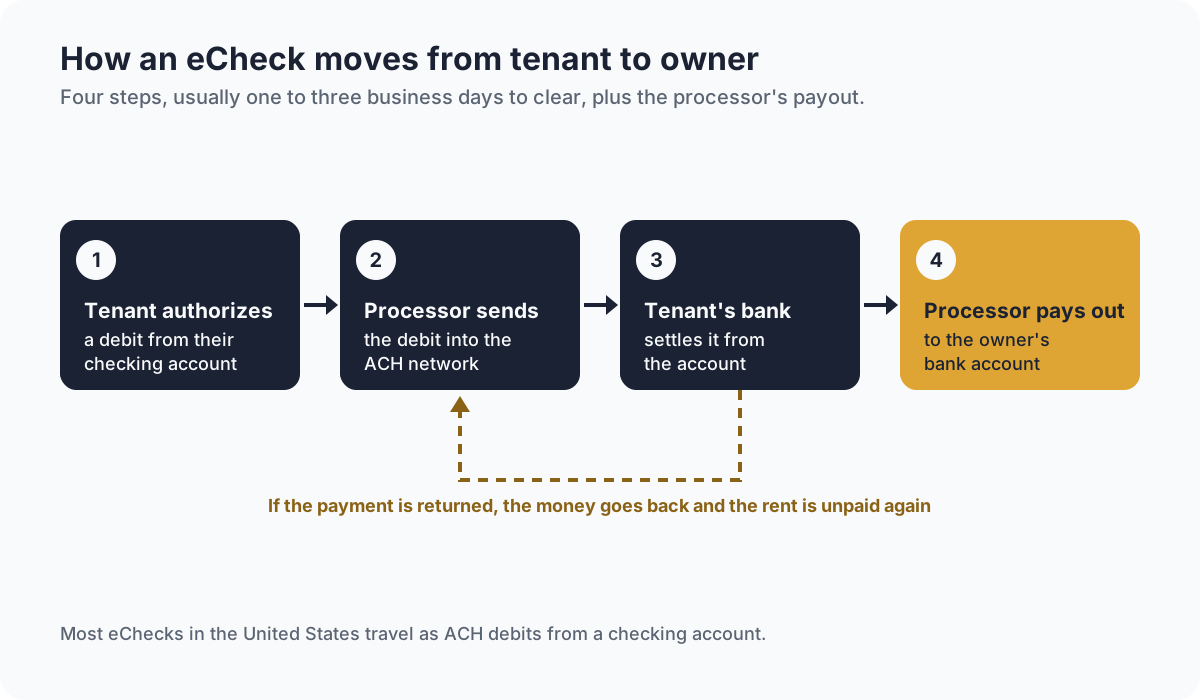
How an eCheck rent payment works
- The tenant authorizes the payment. In a rent portal, the tenant links a checking account, either by entering the routing and account numbers or by signing in to their bank through a connection service, and approves the amount.
- The processor sends the debit. The payment processor sends the debit into the ACH network with other payments, usually the same or the next business day.
- The tenant's bank pays it. The tenant's bank takes the money from the account and settles it, usually within one to three business days.
- The money reaches you. The processor pays the money out to your bank account, on its own payout schedule.
- It can still come back. Until the payment clears, and for a while after, the tenant's bank can return it.
Weekends and federal bank holidays do not count as business days, so an eCheck started on a Friday before a holiday Monday can take until midweek to clear. Your lease can say whether rent counts as paid on the day the tenant starts the payment or on the day it clears. A lease addendum is one way to add that clause to a lease already signed.
eChecks compared with other ways to pay rent
| Method | How it is paid | Typical time to clear | Can it come back? |
|---|---|---|---|
| eCheck | Electronic debit from a checking account | One to three business days | Yes, a returned payment |
| Paper check | Written check, mailed or handed over | A few business days after you deposit it | Yes, a bounced check |
| ACH bank transfer started by the tenant | The tenant's bank pushes the money to yours | One to three business days | Rarely, since the tenant sent it |
| Debit or credit card | Card number through a processor | Approved at once, paid out in a few days | Yes, a chargeback |
| Wire transfer | Sent bank to bank one payment at a time | Usually the same day | Rarely, once sent |
For owners, eChecks usually cost less to accept than cards, arrive without a trip to the bank and land on the ledger with a date and an amount already attached. Tenants avoid the cost of checks and stamps. The trade-off is the wait to clear and the chance of a return.
When an eCheck is returned
An eCheck can be returned for the same reasons a paper check bounces, plus a few that are specific to electronic payments. Each return carries a code from the network rules. The ones you are most likely to see on rent:
- Insufficient funds. The account did not have enough money when the debit arrived.
- Account closed. The tenant closed the account after setting up the payment.
- No account or invalid account number. The numbers entered were wrong.
- Unauthorized. The account holder tells their bank they did not authorize the debit.
Returns for a lack of money or a closed account usually arrive within a few banking days. A claim that a debit was not authorized can come much later, which is why a payment processor may hold back or reverse a payment weeks after it seemed to clear. Keep the tenant's authorization, whether a signed form or a record from the portal, for as long as the lease runs.
A returned payment on the ledger
All the figures here are made up for this example. A tenant's rent is $1,650, due on the 1st. The lease sets a returned payment fee of $35. The tenant pays by eCheck on November 1, and the payment is returned on November 4 for insufficient funds.
| Date | Entry | Charge | Payment | Balance |
|---|---|---|---|---|
| Nov 1 | Rent, November | $1,650.00 | $1,650.00 | |
| Nov 1 | eCheck payment | $1,650.00 | $0.00 | |
| Nov 4 | eCheck returned, insufficient funds | $1,650.00 | $1,650.00 | |
| Nov 4 | Returned payment fee, per lease | $35.00 | $1,685.00 |
The return puts the $1,650 back on the balance, and the fee adds $35, so the tenant owes $1,650 + $35 = $1,685. Record the return as its own line. Deleting the original payment loses the record of what happened. If the new payment arrives after the grace period, the lease's late fee may apply as well, and the late fee calculator works it out. Some states and cities cap returned payment fees and late fees, or set when they can be charged, so check the rules where the property is.
The rent ledger vs tenant ledger guide explains where each of these lines belongs, and a rent statement shows the tenant the charges, payments and balance for the month in one page.
What to put in your lease
- The ways rent may be paid. Name the methods you accept, and check whether a local rule requires you to accept a method that does not need an online account.
- When an electronic payment counts as on time. The day the tenant starts it, or the day it clears.
- Who pays any processing fee. Some processors charge the payer, some the payee. Local rules may limit fees passed on to tenants.
- What happens after a return. The returned payment fee, if any, how the tenant must pay the replacement and whether you may require a certified payment after repeated returns.
Common eCheck mistakes
- Sending a receipt too early. A rent receipt sent before the payment clears can leave a tenant holding a receipt for rent you never received. Send it once the money has cleared.
- Treating a pending payment as paid. Track pending and cleared payments separately, so a return does not surprise you. A rent tracker can hold both columns.
- Erasing the returned payment. Post the return as a new line, so the history shows the payment and the reversal.
- Losing the authorization. Keep the tenant's written or online authorization for every recurring debit.
- Charging fees the lease does not name. A returned payment fee generally needs to be in the lease, and within any local limit.
Frequently asked questions
What is an eCheck in simple terms?
An eCheck is a payment taken electronically from a checking account using the account's routing and account numbers. It does the job of a paper check without the paper, and in the United States it usually travels over the ACH network.
Is an eCheck the same as an ACH payment?
Usually, yes. Most eChecks are ACH debits from a checking account, so the two names often describe the same payment. ACH also covers payments the payer's own bank pushes out, such as direct deposit and bill pay, which are not usually called eChecks.
How long does an eCheck take to clear?
Usually one to three business days from when the payment is started. Weekends and federal bank holidays add time, and the payment service may take a little longer to pay the money out to your bank.
Can an eCheck bounce?
Yes. An eCheck can be returned for insufficient funds, a closed account, a wrong account number or a claim that the debit was not authorized. Until it clears, treat the rent as pending.
Can an owner require rent by eCheck?
It depends on where the property is. Some states and cities require owners to accept at least one payment method that does not depend on a bank account or an online service. Rules vary by state and city. Check your local law or an attorney.
Collect rent by bank or card in one place
Electronic rent is easier to follow when every payment lands on the right lease. In KeyRing, tenants pay by bank or card through Stripe, from the app or any browser, and each payment is matched to the right property and lease. Automatic reminders go out before rent is due and the day after it is late. See what KeyRing does or how plans are priced.
Free calculators and templates
- Late fee calculatorA rent late fee as a flat amount or a percentage, with a grace period.
- Rent receipt templateA printable rent receipt, two to a page, and a CSV log for every payment you receive.
- Rent tracker templateEvery unit on one row and every month in a column, so a year of rent fits on one page.
- Rent statement templateA tenant's charges, payments and balance for a period, from the opening balance to what is due now.
Browse all rental property calculators, free templates and the glossary.
From the blog
- What is an ACH payment? How ACH rent payments workAn ACH payment moves money between US bank accounts over the ACH network. How ACH rent payments work, how long they take, what they cost and when they bounce.
- Rent ledger vs tenant ledger: what to track and whyA lease ledger, or tenant ledger, records one lease's charges, payments and balance. A rent ledger can cover a whole property. See both with worked examples.
- What is a lease addendum? Common addenda and how to add oneA lease addendum adds new terms to a signed lease, such as a pet or a parking space. How it differs from an amendment, common addenda and how to add one.
- What are certified funds? How they work for rent and move-in moneyCertified funds are payments backed by a bank or issuer: cashier's checks, certified checks, money orders and wires. How they work for rent, with an example.