Text messages from KeyRing
KeyRing sends text messages to account holders who opt in. This page shows where you opt in, the exact wording you agree to, what we send, and how to stop.
Who can opt in
Property owners who create a KeyRing account on the web can opt in when they sign up. Opting in is optional and needs a mobile phone number. Tenants and team members join KeyRing by invitation from a property owner, and their sign-up does not include these boxes.
Where you opt in
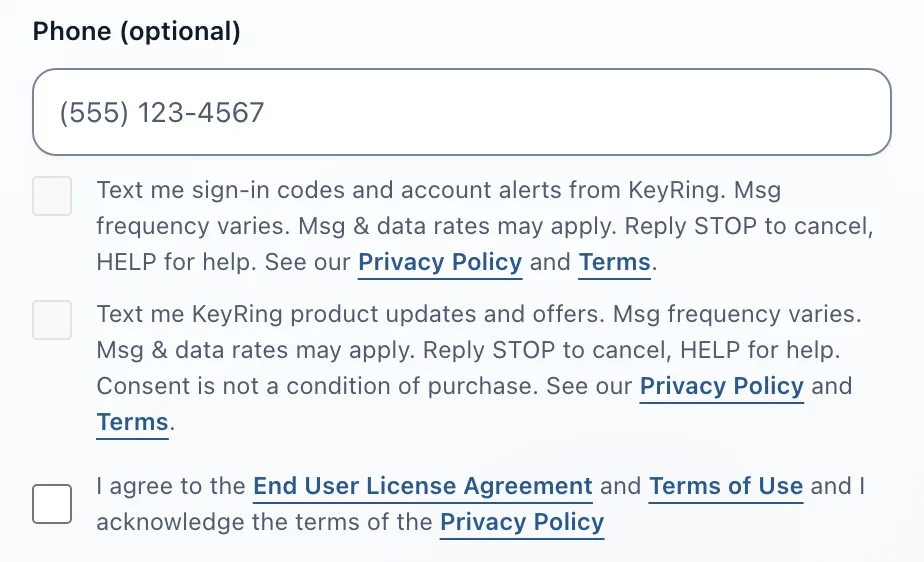
You opt in on the KeyRing web sign-up form at app.keyringpm.com/sign-up. It shows two checkboxes under the optional phone field. Each box starts unticked, can be ticked only after you enter a phone number, and is separate from the box that accepts our Terms of Use. You can create an account with either box, both boxes or neither.
What you agree to
The two checkboxes read, word for word:
Text me sign-in codes and account alerts from KeyRing. Msg frequency varies. Msg & data rates may apply. Reply STOP to cancel, HELP for help. See our Privacy Policy and Terms.
Text me KeyRing product updates and offers. Msg frequency varies. Msg & data rates may apply. Reply STOP to cancel, HELP for help. Consent is not a condition of purchase. See our Privacy Policy and Terms.
What we send and how often
- If you tick the first box: sign-in codes and account alerts for your KeyRing account.
- If you tick the second box: KeyRing product updates and offers.
Message frequency varies. Msg & data rates may apply.
How to opt out
Reply STOP to any text from KeyRing to stop receiving them. Replying STOP ends both opt-ins for that phone number.
How to get help
Reply HELP to any text from KeyRing, or email support@keyringpm.com.
Privacy and terms
Our Privacy Policy states:
"All of the above categories exclude text messaging originator opt-in data and consent; this information will not be shared with any third parties."
Read our Privacy Policy and Terms of Use for more detail.